











Employee Training Compliance for Multi-Location Businesses
Employee training is one of the most overlooked compliance categories — and one of the most common sources of failed inspections. Food handler cards, alcohol service certifications, safety training, harassment training, HIPAA training, pharmacy technician licenses, and dozens of role-specific certifications all carry compliance obligations. For multi-location businesses with thousands of employees and high turnover, manual tracking is impossible. This guide explains how multi-location operators handle employee training compliance and how Copliancy’s employee module supports the workflow.
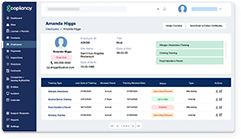
Employee training compliance is one of the most underestimated compliance categories — and one of the most common sources of inspection failures and regulatory action. Multi-location operators are responsible for dozens of training categories spanning food handler certifications, alcohol service training (TIPS, TABC, ABC programs), safety training, harassment prevention, HIPAA awareness, pharmacy technician certifications, specialty licenses, and OSHA-required topics. The challenge compounds with high turnover: in industries like restaurants and retail, 60-100% annual turnover means the training population is constantly changing. Manual tracking via paper certificates and individual employee files breaks down predictably. Effective training compliance requires centralized records per employee, automated enrollment for new hires, expiration tracking with renewal alerts, integration with HR/payroll/POS/scheduling systems, role-based training requirements, and aggregate compliance reporting. Copliancy automates employee training by directly offering mandatory training courses and integrating with existing HR, POS, and scheduling software — used by multi-location operators including major restaurant brands, retail chains, grocery operators, and hospitality companies.
Training Categories Multi-Location Operators Manage
Required by most jurisdictions for restaurant and grocery food handlers. Typically valid 2-3 years. Renewal required to maintain certification.
TIPS, TABC (Texas), ABC (various states) certifications for staff serving alcohol. State-mandated in many jurisdictions; required by employer policy in most others.
Higher-level certification (ServSafe, NRFSP, others) typically required for at least one manager per food service location. 5-year validity.
State-mandated in California, Connecticut, Delaware, Illinois, Maine, New York, Washington and others. Annual or biennial requirement depending on state.
Bloodborne pathogens, hazard communication, ergonomics, lockout/tagout, PPE — various OSHA standards require initial and refresher training.
For healthcare-related operations (including grocery pharmacy, healthcare facilities). Annual training required for covered employees.
State-required certifications for pharmacy technicians. Initial certification plus ongoing CE requirements.
For money services (check cashing, money orders), AML training is required. Cash handling training reduces shrinkage and protects against fraud.
Equipment-specific training (fryer, grill, dish room), product-specific training (alcohol categories, menu items), customer service standards.
Why Training Compliance Matters
Training compliance produces direct downstream effects on the business:
Inspection Outcomes
Inspectors routinely request training records. A location with current food handler cards, alcohol service certifications, and food protection manager documentation passes routine inspections easily. A location with expired or missing certifications generates findings — even if the underlying operations are sound.
Litigation Defense
When incidents occur (alcohol over-service, foodborne illness, harassment claims), the operator’s training records become central evidence. Documented training establishes the operator took reasonable steps to prevent harm.
Insurance Premiums
Liquor liability insurance, general liability, and workers’ compensation all consider training programs in pricing and underwriting. Operators with strong, documented training programs receive better rates.
Operational Quality
Beyond compliance, training drives operational outcomes. Trained staff make fewer mistakes, generate fewer guest complaints, and operate more safely.
Regulatory Standing
For regulated industries (alcohol service, pharmacy, healthcare), training compliance is part of the license condition. Pattern failures can trigger license enforcement actions.
The Multi-Location Turnover Challenge
The defining characteristic of training compliance in restaurants, retail, hospitality, and grocery is high employee turnover. Annual turnover rates in these industries often exceed 60% — and reach 100%+ for hourly positions in some segments.
What this means for training compliance:
- Constant enrollment. New hires arrive every week at most multi-location operators. Each new hire needs training enrollment matched to their role and location.
- Constant verification. Existing employees’ certifications expire on rolling schedules. Verification can’t be a once-a-year exercise.
- Constant offboarding. When employees leave, their training records need to be archived appropriately. Open enrollments for departed employees create confusion and wasted training spending.
- Constant role changes. Employees who move from server to bartender, cook to manager, or general retail to pharmacy need additional training matched to their new role.
Manual tracking can’t keep up with this pace. By the time a manager finishes updating the training spreadsheet for last month’s hires, this month’s hires are arriving and last month’s hires are already moving roles.
A Training Compliance Workflow
-
1
Define Role-Based Training Requirements
For each role (server, bartender, cook, cashier, pharmacy tech, manager), define the training requirements: required certifications, frequency of renewal, mandatory topics. Role-based requirements scale far better than employee-by-employee tracking.
-
2
Automate New-Hire Enrollment
When a new employee is hired, the platform automatically enrolls them in the training program for their role. Integration with HR systems eliminates duplicate data entry.
-
3
Track Completion in Real Time
As employees complete training modules, completion is logged automatically. Managers don’t track this manually; the system updates as training is completed.
-
4
Fire Expiration Alerts
Training certifications with expiration dates (food handler cards, alcohol service certifications, HIPAA training) generate renewal alerts before expiration. Alerts go to the employee and to the appropriate manager.
-
5
Block Operational Access for Lapsed Training
Where appropriate, integration with POS or scheduling can prevent lapsed-certification employees from being scheduled or from accessing certification-required operational tools.
-
6
Aggregate Compliance Reporting
Corporate compliance and HR teams see training compliance across the portfolio. Underperforming locations, expired certifications, and overdue training surface at the aggregate level.
Integration With HR, POS, and Scheduling
Training compliance integrates with three external systems that already exist at most multi-location operators:
HR / HRIS
The HR system is the authoritative source for employee identity, hire date, role, and termination. Training compliance pulls employee data from HR rather than maintaining duplicate records.
POS / Time Clock
POS systems often serve as the time clock at multi-location operators. Integration with POS supports certification-gated functionality (only certified alcohol servers can ring liquor sales) and enforces training requirements at the operational layer.
Scheduling
Scheduling software often pulls from the same employee roster. Training compliance integration ensures that scheduled employees are credential-current and that certification gaps are surfaced before they affect operations.
Without these integrations, training compliance becomes a parallel system that’s always slightly out of date with the operational systems employees actually interact with.
How Copliancy Handles Employee Training
Direct Training Course Delivery
Copliancy automates employee training by directly offering mandatory training courses. Employees complete training within the platform; completion is logged automatically; certifications are issued and tracked.
HR Integration
Integration with HRIS systems (Workday, ADP, BambooHR, Paychex, others) pulls employee data automatically. New hires are enrolled the day they appear in HR; terminated employees are archived appropriately.
POS Integration
Integration with POS systems supports certification-gated functionality. Only certified alcohol servers ring liquor sales; only food handlers prep certain items; only authorized cashiers process money services transactions.
Scheduling Integration
Integration with scheduling software (Crunchtime, R365, 7shifts, HotSchedules, Deputy, others) ensures schedulers see certification status when assigning shifts. Lapsed certifications block scheduling for certification-required shifts.
Role-Based Requirements
Training requirements are defined per role. Employees inherit the requirements for their role automatically; role changes trigger updated training requirements.
Multi-Stage Renewal Alerts
Expiring certifications generate alerts at 90, 60, 30, and 7 days before expiration — to the employee, to the location manager, and (for critical roles) to corporate compliance.
Document Storage
Certification documents, training completion records, and supporting materials live in the platform. External certifications (state-issued food handler cards, third-party-issued ServSafe certificates) can be uploaded and tracked alongside in-platform training.
Aggregate Compliance Reporting
HR and compliance leadership see training compliance across the portfolio — by location, role, certification type, or aggregate. Exception reports surface compliance gaps before they affect operations.
Frequently Asked Questions
Does Copliancy provide its own training content or just track external training?+
Both. Copliancy automates employee training by directly offering mandatory training courses, with employees completing training inside the platform. External certifications (state-issued food handler cards, third-party-issued ServSafe certifications, manufacturer training) can also be uploaded and tracked alongside in-platform training.
How does Copliancy integrate with our HR system?+
Integration with HRIS systems pulls employee data automatically — new hires enroll on their start date, role changes trigger updated training requirements, and terminations archive appropriately. The integration eliminates double data entry and ensures training records stay synchronized with the authoritative employee roster.
Can Copliancy block uncertified employees from being scheduled for certain shifts?+
Yes, through integration with scheduling software. Schedulers see certification status when assigning shifts. Lapsed certifications block scheduling for certification-required positions (alcohol service shifts, pharmacy shifts, money services shifts). The platform enforces compliance at the operational layer rather than after the fact.
What about external certifications like state food handler cards?+
External certifications are tracked alongside in-platform training. The certification document is uploaded, expiration is recorded, and renewal alerts fire ahead of expiration. The employee sees both in-platform training and external certifications in one place.
How does Copliancy handle role-specific training requirements?+
Training requirements are defined per role. When a server is hired, they automatically enroll in the server training program. When that server moves to bartender, the additional bartender training requirements (alcohol service certification, advanced product knowledge) trigger automatically. Role-based requirements scale far better than employee-by-employee assignment.
Can corporate teams see training compliance across all locations?+
Yes. Aggregate compliance reporting surfaces training status across the portfolio — by location, role, certification type, or specific training topic. Exception reports highlight compliance gaps. Operations and HR leadership use these reports to identify locations or roles needing additional attention.